mike's Banner
mike

Age/Gender: 24, Male
Job: stupids

hello!

Newgrounds Stats

Sign-Up Date:
2/24/00

Level: 20
Aura: Neutral

Rank: Police Lieutenant
Blams: 1,161
Saves: 811
Rank #: 3,407

Whistle Status: Normal

Exp. Points: 4,264 / 4,440
Exp. Rank #: 5,172
Voting Pow.: 6.20 votes

BBS Posts: 382 (0.11 per day)
Flash Reviews: 44
Music Reviews: 0
Trophies: 3
Stickers: 0

Entry #20

Jump to Entry: [ 1713 | 14 | 15 | 16 | 17 | 18 | 19 | 20 | 21 ]


mike

Programming Tip: moving an enemy toward the player

Posted by mike Feb. 10, 2009 @ 3:55 PM EST

The player is at position (playerX, playerY), and an enemy is at (enemyX, enemyY). You want the enemy to move 5 units directly toward the player. A lot of times, you'll see people do:

dx = player.x - enemy.x;
dy = player.y - enemy.y;
angle = Math.atan2( dy, dx );
speedX = 5 * Math.cos( angle );
speedY = 5 * Math.sin( angle );
enemy.x += speedX;
enemy.y += speedY;

It took us three hefty trigonometry operations: atan2, sin, and cos. First, we're going from the x and y components (dx and dy) to the angle using atan2. Then we're going BACK to the components using sin and cos! Surely we can avoid running in a circle like this! (haha, in a circle, get it?)

It's a little easier if you think with vectors. We already have a vector pointing in the direction we want: the <dx, dy> vector points straight from the enemy to the player! All we have to do is resize it to our desired speed.

dx = player.x - enemy.x;
dy = player.y - enemy.y;
length = Math.sqrt( dx*dx + dy*dy );
dx /= length; dy /= length; // normalize (make it 1 unit length)
dx *= 5; dy *= 5; // scale to our desired speed
enemy.x += dx;
enemy.y += dy;

We normalize the vector by dividing it by its length. Now our vector has a length of one unit, so we can scale it by our desired speed. Instead of three trig functions, we now have just a sqrt!

It's common to rotate your enemy to face the player. In this case, you DO want to use atan2 to get the angle. You can still avoid the sin and cos, though, by doing what we did above.

Just thought I'd share this little tip, hope it's helpful to someone. Here's a bad diagram:
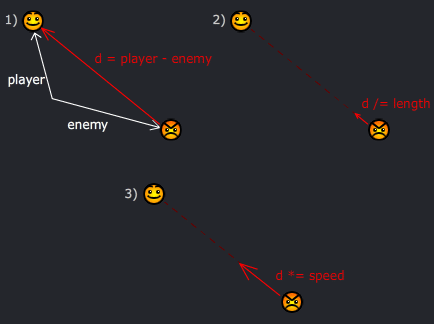
diagram.gif

Log in to comment! | Share this!

The People Have Spoken

54 Comments

Feb. 10, 2009 | 4:21 PM MaestroRage says:

That was easy enough for me to understand, and that means it's awesome. Thanks.


Feb. 10, 2009 | 4:38 PM OneWhoListens says:

Nice! That'll come in really handy. That's the sort of thing I just never think of.


Feb. 10, 2009 | 4:42 PM Flee says:

I really wish my brain could absorb math easily. It hurts when I calculate. D:


Feb. 10, 2009 | 5:03 PM wynand says:

nice =) so you figured it all out yourself? should make a tutorial and submit it =) sure there will be a huge flock of people trying their hand and submitting it =) good work


Feb. 10, 2009 | 5:30 PM The-Super-Flash-Bros says:

Vector maths is so insanely useful in graphical programming. My own Vector2D class is the most used class in my code library by far, so much so in fact that I've had to employ object pooling to speed things up!

I love the diagram

Tom-


Feb. 10, 2009 | 5:53 PM Iamjohn says:

willy. :3


Feb. 10, 2009 | 5:55 PM KurtWilder2027 says:

Ummm...K.


Feb. 10, 2009 | 5:56 PM igott says:

Oh shit.


Feb. 10, 2009 | 6:22 PM Scuzzfest says:

Remember when the hockey puck hit you in the nipple at London?
Good times... Good times.....


Feb. 10, 2009 | 7:58 PM BoMToons says:

That's smart, boy do I feel like an idiot for doing it the other way!


Feb. 10, 2009 | 8:12 PM Blackharrier32 says:

Everything mathematical is so much easier with vectors. Seriously. Whenever anyone I know (including myself) has learnt vector maths, they've just gone "holy crap, why the hell did I waste so much time studying regular trigonometry!"

It also helped me understand the theory behind complex numbers. There's a BIG secret about the square root of minus one, and I don't mean non-existence.


Feb. 10, 2009 | 8:41 PM Lalo says:

I totally got that. Reminded me of my math classes, god i hate analitic geometry so much.


Feb. 10, 2009 | 8:41 PM Lalo says:

I didnt really get it. My sarcasm sucks D:


Feb. 10, 2009 | 10:28 PM Wurmy says:

Now, why is normalizing called normalizing? Surely they could have thought up a better name for it.. like the one I can't think of right now.


Feb. 11, 2009 | 12:37 AM RickyBrown says:

your so cool


Feb. 11, 2009 | 1:04 AM Glaiel-Gamer says:

or wrap it in a class. Which is so much nicer in c++ when you have operator overloading.


Feb. 11, 2009 | 8:38 AM brenhil says:

WoW, that was easy to read! Thanks!


Feb. 11, 2009 | 11:35 AM weaselfan says:

you never seace to amaze me mike


Feb. 11, 2009 | 2:27 PM Atgod88 says:

I was like wtf until i saw the diagram, that should be in every programming book from now on.

Also, adding sniper rifles saves time with this coding :D


Feb. 11, 2009 | 4:59 PM SEXORCIST10 says:

cool


Feb. 11, 2009 | 6:40 PM Ismael92 says:

It's cool to see how you did something that so many people think it's difficult but in a simple way. I had to remember some things I learnt in my English class years ago to fully understand it, and it's good.

Thanks, I don't think I'll use it but someone probably will.


Feb. 11, 2009 | 8:46 PM Dragproductions says:

Man
That makes sence.
I've been thinking about how you do that and you just answered my question.
Thanks
-DragProductions


Feb. 12, 2009 | 5:18 PM 4everZer0 says:

no offense, this is nothing more than an opinion, but why not just use a motion tween? unless of course you want less frames which doesn't always bother people..


Feb. 12, 2009 | 11:36 PM The-EXP says:

Why even bother with a tween? Why not FBF that bad boy over to your hero character?


Feb. 12, 2009 | 11:37 PM Glaiel-Gamer says:

Why even bother with FBF when you can just webcam yourself holding puppets?


Feb. 12, 2009 | 11:38 PM The-EXP says:

Puppets? What are you, queer? Just yell at the screen until the enemy characters move towards your player. Then instruct the players to do the same.


Feb. 12, 2009 | 11:41 PM Glaiel-Gamer says:

No cause you have to type it in. Try this:

setMovietitle (Tanks on Rampage);
TotalFrames (540);

setscript "Green Tank rolling over a school bus, a bus driver named Otto jumps out of it and begins climbing the tank, he jumps inside and knocks the guy out and begins driving the tank into the sunset";

startAnimation;

gotoAndPlay(1);


Feb. 13, 2009 | 12:53 AM jmtb02 says:

I just took a hammer and cracked open the screen so I could reach in and move the players around. You crazy earth creatures and your maths.


Feb. 13, 2009 | 11:21 AM Givion says:

mike u got the best games and relly doom u dont even have to download the shareware awsome! ill be checking up on new games :)


Feb. 13, 2009 | 8:26 PM TheDarkKnight21 says:

wtf is all this for?


Feb. 14, 2009 | 3:33 PM JohnnyUtah says:

BORING

*SNORREEEEEE*


Feb. 14, 2009 | 5:58 PM rednekSVK says:

This helped me a lot
Thanks!


Feb. 17, 2009 | 4:43 AM mongoid says:

Good ol' Pythagoras. He makes a tasty theorem.


Feb. 18, 2009 | 9:17 AM darknessdweller says:

Oh how nice.


Feb. 18, 2009 | 2:18 PM Cyberdevil says:

Great tutorial, thanks.


Feb. 21, 2009 | 1:45 PM TheSongSalad says:

sweet! this is a lot of help for in my game! thanks!


Mar. 1, 2009 | 2:08 PM Daigon99 says:

Wow, thanks!

This will really help with my new game.


Mar. 4, 2009 | 7:36 AM neeko says:

Nice tip. NEver really thought about using vectors to figure this out.


Mar. 9, 2009 | 2:29 AM steventhegreat says:

that just caused my brain to hemoredge


Mar. 15, 2009 | 12:06 AM Kwing says:

How do I get Artifact 19? (PM me, I probably won't check this later)


Mar. 15, 2009 | 10:46 PM theAnt101 says:

Dude, your so fuckin smart, MY brain explodes at this stuff! While you can do this no sweat!


Mar. 16, 2009 | 12:54 AM Kwing says:

Judging on how many medals you have, you'll probably want to know that Fear Unlimited Issue 2 has medals.


Mar. 28, 2009 | 12:32 AM und3rd06 says:

Wow it's good to see a thread about this.

My mind is "rusty" math wise. it's been a while.

I am trying to make my object go towards another but it doesn't seem to work. Can someone see what I am doing wrong ?

In the blow example I simply want to return the new point of m_objEntity. I want to move m_objEntity towards m_objTarget. The .Left propety is = "x" and the Top property is for "y"

Dim intSpeed As Integer = 4
Dim length As Double
Dim directionX As Double
Dim directionY As Double
Dim ReturnX As Double
Dim ReturnY As Double

directionX = m_objEntity.Left - m_objTarget.Left
directionY = m_objEntity.Top - m_objTarget.Top
length = Math.Sqrt((directionX * directionX) + (directionY * directionY))

' normalize (make it 1 unit length)
directionX = directionX / length
directionY = directionY / length

' scale to our desired speed
directionX = directionX * intSpeed
directionY = directionY * intSpeed

ReturnX = m_objTarget.Left + directionX
ReturnY = m_objTarget.Top + directionY

Return New Point(CType(ReturnX, Integer), CType(ReturnY, Integer))


Mar. 28, 2009 | 12:44 AM und3rd06 says:

BTW,

I can make it work using atan2, sin & cos with the following. Note that I want to return what I want to add to m_objEntity.. That's why the last two lines are commented.

Dim intSpeed As Integer = 4
Dim directionX As Double
Dim directionY As Double
Dim speedX As Double
Dim speedY As Double
Dim dblAngle As Double

directionX = m_objTarget.Left - m_objEntity.Left
directionY = m_objTarget.Top - m_objEntity.Top
dblAngle = Math.Atan2(directionY, directionX)
speedX = intSpeed * Math.Cos(dblAngle)
speedY = intSpeed * Math.Sin(dblAngle)
'm_objEntity.Left += CInt(speedX)
'm_objEntity.Top += CInt(speedY)

Return New Point(CType(speedX, Integer), CType(speedY, Integer))


Mar. 28, 2009 | 12:47 AM und3rd06 says:

I got it !!!!!!

here is the working code...needs tweaking if speed wont hit dead on the target because it will always "flicker" trying to reach the target

Dim intSpeed As Integer = 4
Dim length As Double
Dim directionX As Double
Dim directionY As Double

directionX = m_objTarget.Left - m_objEntity.Left
directionY = m_objTarget.Top - m_objEntity.Top
length = Math.Sqrt(directionX * directionX + directionY * directionY)

If length = 0 Then
Return New Point(0, 0)
End If

' normalize (make it 1 unit length)
directionX /= length
directionY /= length

' scale to our desired speed
directionX *= intSpeed
directionY *= intSpeed

'enemy.x += directionX
'enemy.y += directionY

Return New Point(CType(directionX, Integer), CType(directionY, Integer))


Mar. 30, 2009 | 2:14 AM crapatflash says:

nice tutorial-thing. Oh, and it's only after i play the real Doom that i truly appreciate the greatness of your flash doom. good job.


Apr. 1, 2009 | 5:16 PM AudioVision says:

YOU MUST DO OBEY FOR TO MAKE GLORIOUS CHINA FOR CHAIRMAN FULP!


Apr. 3, 2009 | 12:00 PM DeadlyMace says:

im not so gread in math. In fact i suck at math. at least you could help other than an idiot like me.


Apr. 11, 2009 | 10:47 PM shadowthing says:

most people think programing is easy, i say fuck them


Apr. 20, 2009 | 3:00 AM Merlin-Rune says:

Every time you post a blog update, I feel a little more like an uneducated ape.


May. 1, 2009 | 2:29 PM madmaximas says:

The player is at position (playerX, playerY), and an enemy is at (enemyX, enemyY). You want the enemy to move 5 units directly toward the player. A lot of times, you'll see people do:

dx = player.x - enemy.x;
dy = player.y - enemy.y;
angle = Math.atan2( dy, dx );
speedX = 5 * Math.cos( angle );
speedY = 5 * Math.sin( angle );
enemy.x += speedX;
enemy.y += speedY;

It took us three hefty trigonometry operations: atan2, sin, and cos. First, we're going from the x and y components (dx and dy) to the angle using atan2. Then we're going BACK to the components using sin and cos! Surely we can avoid running in a circle like this! (haha, in a circle, get it?)

It's a little easier if you think with vectors. We already have a vector pointing in the direction we want: the <dx, dy> vector points straight from the enemy to the player! All we have to do is resize it to our desired speed.

dx = player.x - enemy.x;
dy = player.y - enemy.y;
length = Math.sqrt( dx*dx + dy*dy );
dx /= length; dy /= length; // normalize (make it 1 unit length)
dx *= 5; dy *= 5; // scale to our desired speed
enemy.x += dx;
enemy.y += dy;

We normalize the vector by dividing it by its length. Now our vector has a length of one unit, so we can scale it by our desired speed. Instead of three trig functions, we now have just a sqrt!

It's common to rotate your enemy to face the player. In this case, you DO want to use atan2 to get the angle. You can still avoid the sin and cos, though, by doing what we did above.

Just thought I'd share this little tip, hope it's helpful to someone. Here's a bad diagram:

MAKES 0 SENCE!!!!


May. 3, 2009 | 6:43 AM Jackho says:

im confumbled


May. 16, 2009 | 6:19 AM shikamaru-nara says:

... You're a god damn genius, when I was trying to make an enemy program, I went right onto trigonometry.
._.


Jun. 24, 2009 | 6:38 PM Stickman91 says:

Hey, that's pretty slick! Thanks for sharing, I think I'll use it! :D

Jump to Entry: [ 1713 | 14 | 15 | 16 | 17 | 18 | 19 | 20 | 21 ]